
DataCare Softech - Jewellery SoftwareDataCare SoftechDataCare Next ERP

RFID jewellery software

RFID Jewellery Software — count the whole showroom in minutes

Tag by tag, a stock check in a busy showroom takes a day. With the DataCare RFID solution a handheld Zebra reader scans every piece on a counter from a short distance, matches it to DataCare Next and shows what is missing — in minutes, without taking a single piece out of the tray.
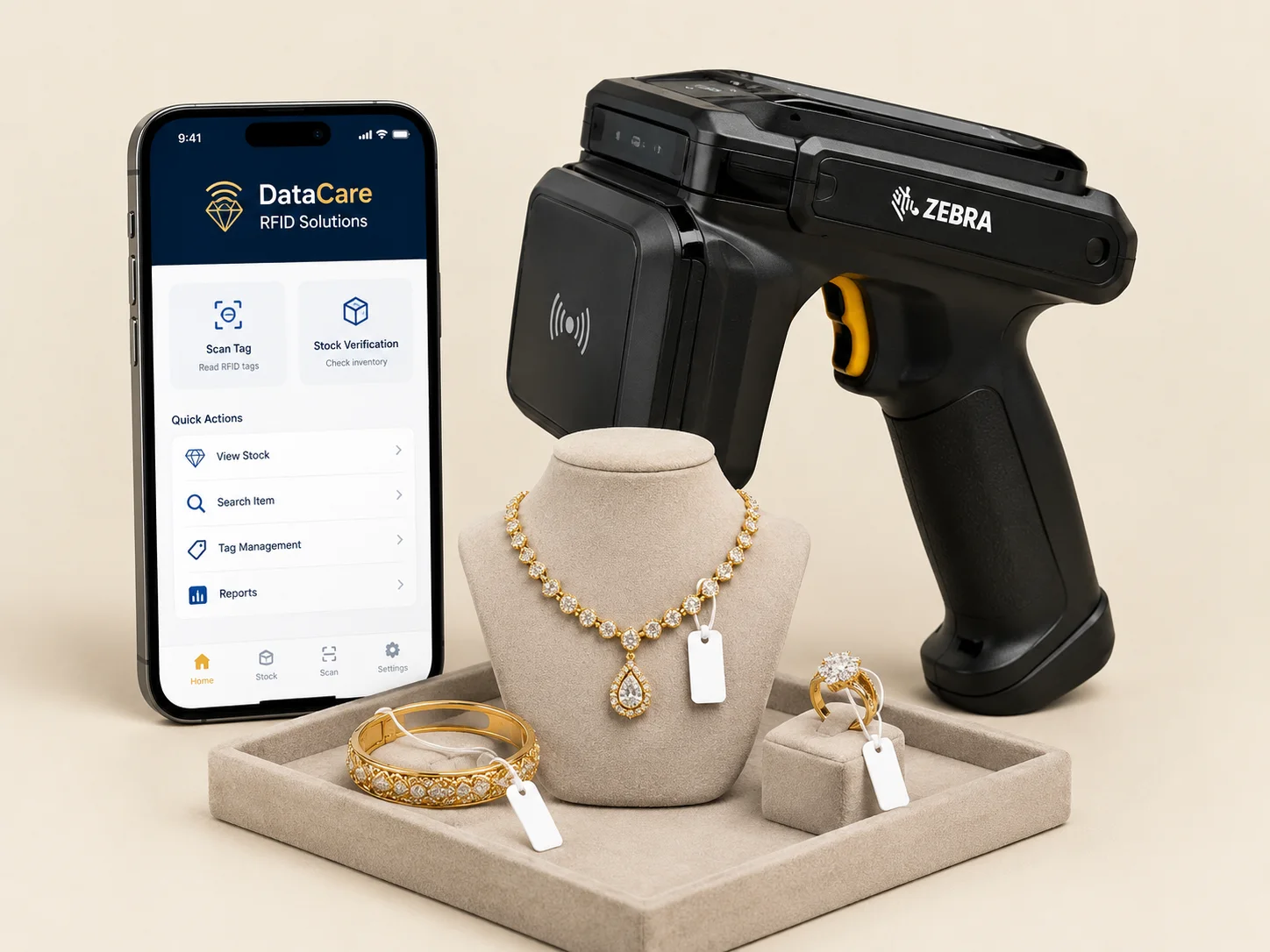
  • Zebra reader + tags + app
  • Works with your barcode tags
  • Installed & trained by our team
DataCare RFID solution – Zebra handheld reader, RFID-tagged jewellery and the DataCare RFID app

In detail

RFID on top of the stock you already have

Each piece gets an RFID tag linked to its existing barcode tag number (tag mapping), so RFID adds to your current stock — nothing is re-entered. The DataCare RFID mobile app runs stock verification counter by counter, searches for a specific tag when a piece cannot be found, and reads a whole tray of items into an approval or transfer.

Our team supplies the complete kit — tags, handheld reader and app — installs it, maps your current stock and trains the staff. RFID integration is available with the Enterprise edition of DataCare Next, and barcode and RFID work side by side, so you can roll it out one counter at a time.

What the RFID kit does

Full stock count in minutes

Sweep the reader over a counter; every tagged piece is counted at once.

Find a missing piece

Search for one tag and the reader beeps louder as you get closer.

Keeps your barcode tags

RFID tags are mapped to your existing tag numbers — no re-entry.

DataCare RFID mobile app

Stock verification, tag search and tag mapping on an Android phone.

Same-day discrepancy

A missing piece shows up the same day, not at the year-end count.

Installed & trained by us

We supply the kit, map the stock and train your counter staff.

Stock & Inventory

Everything in the stock & inventory module

8 features from the DataCare Next feature list. See all 36 features on the home page.

  • Barcode / QR Tag Printing

    Generate, edit, split and cancel tags with gross weight, net weight, purity, design and karigar. Print on any jewellery barcode printer.

  • RFID Stock Tracking

    Count the full showroom in minutes with an RFID reader instead of scanning tag by tag. Available as an add-on with the Enterprise edition.

  • Counter-wise Stock

    Know which counter holds which pieces. Transfer between counters and verify stock counter by counter at the end of the day.

  • Weighing Scale Integration

    Read weight directly from the electronic scale into the bill or tag. Fewer typing mistakes and faster billing at the counter.

  • Dead Stock & Fine Reports

    Find slow-moving pieces with the dead stock report and see total fine weight of gold and silver across your business.

  • Approval / Jangad

    Issue and receive goods on approval with complete weight tracking, so pieces sent to customers or traders are never forgotten.

  • Purchase & Lot-wise Purchase

    Purchase and debit notes with metal and amount, wholesale rate-cut entries, and lot / batch-wise purchase management in Enterprise.

  • Weight-range Stock Movement

    See stock movement by weight range and supplier, and set minimum stock levels so best-sellers never run out.

Editions

Available in these DataCare Next editions

RFID integration is an add-on to the Enterprise edition. Barcode tagging is included in every edition.

Advance

Manufacturing Unit

  • Includes all Pro features
  • Employee salary management
  • Tag split facility
  • Audit interest & depreciation reports

Enterprise

Multi-Branch Ecosystem

  • Includes all Advance features
  • iOS app & branch management
  • Customer loyalty program
  • Bill & item-wise profit analytics

Compare all 7 editions

FAQ

Questions about rfid jewellery software

Which RFID reader do you use?

A Zebra handheld RFID reader, supplied and configured by our team along with the tags and the DataCare RFID app.

Do I have to replace my barcode tags?

No. Each RFID tag is mapped to the piece’s existing barcode tag number, so your stock, reports and billing continue exactly as before.

Does RFID work on small pieces like rings and earrings?

Yes. Jewellery RFID tags are small hang-tags that attach like a barcode tag; we choose the tag type for your items during setup.

Which edition includes RFID?

RFID integration is available as an add-on with the Enterprise edition of DataCare Next. Ask for a quote with the number of counters and pieces you want to cover.

How long does a stock count take?

A counter with a few hundred tagged pieces is read in a few minutes; the whole showroom is verified counter by counter the same day, and the app shows any piece that did not scan.

Book a demo

Book a free demo of DataCare Next

See the full jewellery cycle with your own workflow. Fill the form, or call / WhatsApp any member of our team.

We only use your number to arrange your demo. No spam.

Prefer to talk?

Pick anyone from our team and call or WhatsApp them directly.

DataCare Softech

1019, STC (Shivam Trade Center), Beside One World West, Nr. Vakil Saheb Bridge, S. P. Ring Road, Bopal, Ahmedabad, Gujarat 380058

Get directions

Datacare Softech FZCO

Dubai Silicon Oasis, DDP, Dubai, UAE

Mon–Sat, 10:00 AM – 7:00 PM · Sunday closed

Call WhatsApp

Talk to our team

Choose whom you’d like to call or WhatsApp

Every member of our team handles sales and service. Mon–Sat, 10 AM – 7 PM.

Team leaders

  • Hemal Soni, Team Leader – Sales at DataCare Softech

    Hemal Soni

    Team Leader – Sales

  • Vishal Gundalia, Team Leader – Sales at DataCare Softech

    Vishal Gundalia

    Team Leader – Sales

  • Vikas Barvadiya, Team Leader – Sales at DataCare Softech

    Vikas Barvadiya

    Team Leader – Sales

  • Devendra Dobariya, Team Leader – Sales at DataCare Softech

    Devendra Dobariya

    Team Leader – Sales

  • Ajay Kambaliya, Team Leader – Sales at DataCare Softech

    Ajay Kambaliya

    Team Leader – Sales

Dubai – Datacare Softech FZCO

  • Morvin Vekariya, Sales & Support – Dubai at DataCare Softech

    Morvin Vekariya

    Sales & Support – Dubai

  • Shreyash Thummar, Sales & Support – Dubai at DataCare Softech

    Shreyash Thummar

    Sales & Support – Dubai

Sales & service team – India

  • Kishor Jhavandhra, Sales & Technical Service at DataCare Softech

    Kishor Jhavandhra

    Sales & Technical Service

  • Prakash Soni, Sales & Technical Service at DataCare Softech

    Prakash Soni

    Sales & Technical Service

  • Dipak Dobariya, Sales & Technical Service at DataCare Softech

    Dipak Dobariya

    Sales & Technical Service

  • Sachin Vora, Sales & Technical Service at DataCare Softech

    Sachin Vora

    Sales & Technical Service

  • Parth Hirani, Sales & Technical Service at DataCare Softech

    Parth Hirani

    Sales & Technical Service

  • Pankaj Barvadiya, Sales & Technical Service at DataCare Softech

    Pankaj Barvadiya

    Sales & Technical Service

  • Amar Shingare, Sales & Technical Service at DataCare Softech

    Amar Shingare

    Sales & Technical Service

  • Darshit Savaliya, Sales & Technical Service at DataCare Softech

    Darshit Savaliya

    Sales & Technical Service

  • Divyesh Gajjar, Sales & Technical Service at DataCare Softech

    Divyesh Gajjar

    Sales & Technical Service

  • Kunj Rakholiya, Sales & Support at DataCare Softech

    Kunj Rakholiya

    Sales & Support

  • Harshil Changani, Sales & Support at DataCare Softech

    Harshil Changani

    Sales & Support

  • Ronak Dobariya, Technical Support at DataCare Softech

    Ronak Dobariya

    Technical Support